✨ Coming soon ✨
Check back for more updates...
⭐️ Recent Releases ⭐️
Workshop Email Nudges
Release: August 03, 2026
We are thrilled to introduce automated Workshop Email Nudges to the LifeLabs Learning Platform! Designed to help learners prepare effectively and retain new skills long after the session ends, these tailored communications run automatically, ensuring your team gets the most out of their workshop experience.
What’s New?
Pre-Workshop Prep Email Nudges: Sent automatically exactly 7 days before a session (at 10:00 AM in the learner’s local time zone) to all learners registered for a workshop . These emails are tailored to the specific workshop topic and include expectations, thought-starters, and prep resources so learners arrive confident and ready to dive in.
Post-Workshop Reinforcement Email Nudges: Sent 7 days after a session to those who attended a workshop. These messages spotlight key takeaways, provide follow-on resources, and prompt learners to apply their new skills in their day-to-day work.
New Admin Notification Controls: Client Admins now have complete control over these automated communications. In the Admin Hub, you can easily enable or disable Pre- and Post-Workshop emails for your entire organization. Additionally, we’ve also added a new toggle that allows you specific notification control for the initial platform welcome email that is sent when learners are added to the team list. Note, these controls have been released to the Admin Hub > Settings > Notifications ahead of the release for Sponsors to be able to adjust settings before the notification functionality is released.
Learner Email Preferences: We respect your learners' inboxes. Because these are non-transactional communications, learners have the power to opt out of pre- and post-workshop emails at any time via an "Email Preferences" link at the bottom of the email, or directly from their Learning Center. Learner preferences will always override global organizational settings for these notifications.
New workshop: Skills Lab
Release: May 7, 2026
What's new? All learning programs now conclude with Skills Lab, a hands-on, customized experience designed to give learners the practice time they frequently ask for. This new addition allows participants to directly apply new concepts to real workplace scenarios.
What to expect:
-
- Customized learner experience: Each Skills Lab is shaped around your specific team priorities, making new skills highly relevant and immediately actionable.
- Hands-on Practice: Transition smoothly from learning theory to real-world application.
Learning Programs
Release: May 7, 2026
What's new? We have officially expanded and refreshed our learning programs to support the modern realities today's workplace teams are navigating. Building on our signature science-backed, behavior-focused approach, our new curriculum is organized into intentional learning journeys tied directly to real business outcomes.
Explore our new and refreshed programs:
-
- Manager Core: Strengthened to better support managers and build higher-performing teams.
- Change & Alignment: Designed to help leadership navigate transition with clarity and alignment.
- Focus & Productivity: Focused on improving prioritization, execution, and daily focus.
- Collaboration & Trust: Created to build strong team trust and navigate conflict effectively.
- Workplace Core: Developed to boost communication, feedback, and overall workplace effectiveness.
Many of these programs began as successful, custom solutions built directly alongside clients. After measuring their deep impact, we are excited to make these optimized training experiences available to organizations everywhere.
Updated calendar invite functionality
Release: April 14, 2026
What's new? An upcoming update to invite functionality in the LifeLabs Learning platform will make workshop invites much easier to manage for you and your learners.
| Learner interaction | New Invites | Previous Invites |
| Calendar |
All invited learners instantly receive a calendar event -- no prior RSVP needed! This is enables you to increase your learners' visibility to upcoming workshops you have invited them to. |
All invited learners receive an email. Only learners who RSVP 'yes' from the email receive a calendar event. |
| RSVP |
Learners RSVP directly on their calendar event. This automatically updates their RSVP in the platform. This enables you to increase your visibility to your learners' RSVP status. |
Learners must log in to the platform to RSVP to an event. RSVP-ing to the calendar event has no impact on the platform RSVP status. |
| Join a workshop |
Learners can now join an event in just 2 quick clicks! All invited learners can click the hyperlink in the calendar event to immediately land on the event page, then click "Join now" button. |
It could take up to ~8-10 clicks to join an event. Learners need to authenticate (i.e., log in) to the platform in order to view the event page, then they must RSVP 'yes' before clicking the "Join now" button. |
Why are we making this change? This change is designed to address specific requests from active users (you!) to:
-
-
reliably populate invites directly on learners' calendars.
-
have clear visibility to learners' RSVPs.
-
reduce manual follow up actions to confirm RSVPs.
-
Here's a walkthrough of the new experience
FAQs
-
-
What actions do I need to take to enable this feature after release?
None. Any invites sent from the platform after the release will automatically follow the updated invite functionality.
-
-
- What happens to the invites I sent out prior to the release?
Those invites are not updated. Any invites sent from the platform prior to the updated calendar invite functionality release will follow the previous invite experience. Review the differences above and we'll provide guidance for how to convert your invites (if needed) closer to release.
- How can I identify whether a learner received a new or 'legacy' invite?
In the Admin Hub, the * in the 'Confirmation' column of the event page indicates that an invite was sent prior to the new release. This will begin to appear after the release day.
- How can I identify whether a learner received a new or 'legacy' invite?
- What email will the calendar invites come from?
Invites will come from Learn@lifelabslearning.com. You likely already have this on your allowlist and should not need to take any additional action to ensure your learners receive the invite. - What if I remove or un-invite a learner from a workshop?
The event will automatically disappear from the learner's calendar and they will receive a notification letting them know. Both of these are functionality upgrades! In the previous system, learners had to manually manage their own calendar and there were no automated notifications. - What happens if a learner deletes the event from their calendar? Does that change their RSVP status?
Deleting a calendar event does not impact a learner's RSVP. The learner's RSVP status in the platform will remain in the same status it was at the time the learner deleted the calendar event. - What if I have notifications turned off for my learners?
Your learners will not receive invite notifications or calendar events. This means they will not be able to RSVP to new invites, but they will be still be able to join the event, regardless of their RSVP status, via the LifeLabs Learning platform. Reach out to support@lifelabslearning.com to turn on notifications for your learners.
- What happens to the invites I sent out prior to the release?
Related resources:
Refresh yourself on the current invite experience from the articles below -- we'll update these with new info after release.
'Reports' tab in the LifeLabs Learning Platform
Released: January 27, 2026
What's new? You asked for it and we're excited to share the first version of the 'Reports' dashboard! The Reports dashboard makes your program’s results easy to see — and easy to share. Spot trends, track engagement, and connect learning to outcomes, all in one place, on your time.
Built for storytelling, not just scorekeeping, the Reports dashboard goes beyond data display to help you make the case for learning.
-
- Executive-ready rollups help you share results with clarity and confidence
- Learner sentiment and feedback are surfaced directly, no digging required
- Fully self-serve, so you can explore and share insights with no waiting
FAQs
-
- Do I need to purchase access the 'Reports' dashboard?
No! This feature is automatically included for all active accounts in the platform. - Who can access the 'Reports' dashboard?
All active sponsors (i.e., admins) in the LifeLabs platform. - What data is included in the Reports?
All historic platform data is included. Registration, attendance, and feedback responses from events that took place prior to the feature release are included in the reports, in addition to all future data collected after the release.
- Do I need to purchase access the 'Reports' dashboard?
Learn more: additional details can be found here.
Delegation on-demand course
Released: November 12, 2025
What's new?
In the LifeLabs Learning Platform, there is now a 35-minute on-demand course that covers the same behaviors and methods included in the live workshop.
How can your learners access this course?
This course is available to all Level Up and Lead Up members, and all clients who have purchased a Delegation workshop. Talk to your consultant about how the Delegation workshop can benefit your team!
LabCoachᴬᴵ
Released: October 21, 2025
What's new?
LabCoachᴬᴵ provides learners with a dedicated practice space to build skills through in-the-moment coaching and feedback. It’s designed to help learners apply what they’ve learned, get instant guidance, and strengthen habits between workshops.
After LabCoachᴬᴵ is enabled in your account, your learners will have access to AI assistants focused on:
-
- Coaching – practice asking powerful questions, active listening, and guiding conversations.
- Feedback – get support by giving clear, kind, and actionable feedback in tricky situations.
- Strategic Thinking – work through challenges that require prioritization and big-picture thinking.
- Communication – practice tailoring messages, handling tough conversations, and being concise.
- Delegation – strengthen skills for assigning tasks, setting expectations, and building trust.
What learners will see:
LabCoachᴬᴵ is like having a personal coach available 24/7. Learners can:
-
-
Choose the skill they want to practice (e.g., giving feedback to a teammate).
-
Engage in a realistic conversation with an AI assistant that simulates workplace scenarios.
-
Get instant, personalized feedback on what they did well and where they can improve.
-
Repeat and refine as many times as they’d like, building confidence through practice.
-
Want more details?
Check out our LabCoachᴬᴵ support article!
Please connect with your LifeLabs Learning Consultant to discuss adding on the LabCoachᴬᴵ feature.
Increased clarity in workshop emails for non-US attendees
Released: October 1, 2025
What’s new?
Workshop-related email notifications sent to learners will now include both ET & PT times, as well as a disclaimer for learners who are attending from outside the US - the disclaimer includes a hyperlink to a world-clock converter!. This will provide increased clarity for learners on when workshops are happening in their time zone.
You can view all emails and notices sent to learners in the User Notifications article!
Send invite reminders in bulk
Released: October 1, 2025
What’s new?
You can click into a workshop and send a reminder to all learners who have not yet responded to their invite. You no longer have to initiate a reminder for each learner individually! But you still can, if you want to.
Read the full details here: Invite learners to workshops in the LifeLabs Learning Platform
FAQs
-
- Will learners all be cc'd on the same email?
No. Each learner will receive their own unique email notification prompting them to respond to the invite you sent.
- Will learners all be cc'd on the same email?
Platform navigation updates
Released: October 1, 2025
What’s new?
Several tabs have been renamed in the Admin Hub + Learning Center to align with LifeLabs Learning naming conventions and create more clarity for Admins and learners navigating the platform.
-
- Admin Hub: "Dashboard" tab renamed to "Courses & Resources"
- "Courses & Resources" moved to third position on the left side navigation menu [from top position].
- This will not impact the URL for this platform page. The URL will remain https://www.app.lifelabslearning.com/dashboard.
- Admin Hub + Learning Center: "Events" tabs renamed to "Workshops"
- This will not impact the URL for this platform page. The URL will remain https://www.app.lifelabslearning.com/events or https://app.lifelabslearning.com/learning/events.
- Admin Hub: "Team List" tab moved to the top position on the left side navigation menu.
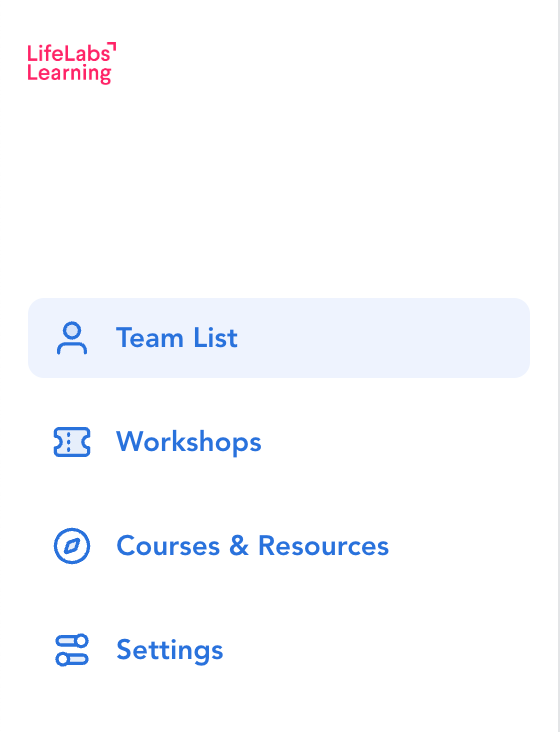
- Admin Hub: "Dashboard" tab renamed to "Courses & Resources"
Email learners who do not respond to an event invite
Released: June 16, 2025
What’s new?
Learners who do not respond to an event invite within 7 days will receive an email reminder auto-sent from our system to prompt folks to RSVP and help drive event registration and attendance. This reminder is only sent to invitees when the invite is sent at least 8 days prior to the event.
Read the full details here: What kinds of user notifications are sent from the platform?
FAQs
-
- Will the email be sent every 7 days until the learner responds (or the event is completed)?
No. The email reminder will only be sent 1x and then the learner will not receive any further reminders. - Are there unique versions of the email for 'required' and 'optional' invites?
Yes. View the different versions from the 'email previews' in the article linked above. - Will this email be sent to learners if our company account has notifications disabled?
No. The automation is only sent to learners if your company has email notifications enabled in the LifeLabs Learning platform. Note: Having notifications on is the default setting. Email notifications are only disabled on request. - Can this notification be sent via Slack?
No. This notification can only be delivered via email. - What time is the email sent?
7am US Eastern Time.
- Will the email be sent every 7 days until the learner responds (or the event is completed)?
Un-invite (remove) a learner from an event
Released: June 27, 2025
What’s new?
Admins can now un-invite (or remove) a learner from an event that the learner is invited to. This enables you to maintain a clean learner list for your events and eliminate manual communications you’re sending to learners you’ve wanted to remove from an event after inviting them.
Before this release, you could only remove learners who had accepted an invite. Now you can remove a learner of any response status.
Read full details here: Invite learners to workshops in the LifeLabs platform
When might you use this function?
-
-
Accidental add: You include the wrong learner on the invite by mistake and need a quick way to undo it without spamming that person with manual follow-up emails.
-
Scheduling conflict: An invitee realizes they can’t attend the specific session and plans to join a different cohort.
-
Roster reshuffle: You want to switch up your cohort(s) for various internal reasons.
-
FAQs
-
- What if a learner tries to accept an invite after I remove them from the event?
The learner will see an error message stating “This invitation is no longer valid” and their RSVP is rejected; they will not be able to register for the event unless they are re-invited to the workshop.
- What if a learner tries to accept an invite after I remove them from the event?
Download qualitative event feedback responses
Released: June 30, 2025
What’s new?
Access learners' qualitative feedback responses from the post-workshop survey on a per event basis. You’ll get to see what your learners have to say about:
-
- How would you describe this workshop in one word?
- What is one thing that worked well for you in this workshop?
- What would make this workshop 10% better?
- Anything else you would like us to know about your experience today?
Read full details here: Check workshop attendance and feedback in the LifeLabs Learning platform
Event page URL added to calendar descriptions
Release: June 30, 2025
What’s new?
A link to the platform event page will be included in the description of the calendar event the learner receives. This is in addition to the event page URL that’s already included in the location field of the calendar event.
This will help learners quickly and clearly locate the link to join their workshop directly from their calendar event.
FAQs
-
-
Will this retroactively apply to existing calendar events?
No. This will only apply to calendar events learners receive from the platform after this update is released.
-
Company names in subject of ‘Welcome email’ to learners
Released: June 30, 2025
What’s new?
Your company name will appear in the subject line of the welcome email sent to learners to help more clearly signal to learners that this email is expected [and not spam!].
Read full details here: What kinds of user notifications are sent from the platform?
Track self-directed learning
Released: June 30, 2025
What’s new?
Learners and Admins can track Courses and Resources that learners complete at their own discretion (i.e., self-directed). This makes it easier for users to track progress and access all completed courses and resources in one place.
-
-
Learners, you can access this from the Learning Center - Completed tab. Previously, this view only included courses or resources an Admin assigned to their learners (in addition to event attendance data).
-
Admins, you can access this from learner transcripts in the Admin Hub. Previously, transcripts only included completion data related to courses/resources you assigned (in addition to event registration/attendance data).
-
Read full details here:
FAQs
-
- Will this change apply retroactively to any courses or resources a learner completed prior to this release?
Yes. Any courses or resources completed prior to this release will display as noted above after the update is released.
- Will this change apply retroactively to any courses or resources a learner completed prior to this release?